
Document workflow

Streamline the flow of information and automate the document workflow in your company

Digitize and automate document workflow, increase office work efficiency, and reduce operating costs. Our module enables efficient management of electronic documents, automation of approval and circulation processes, and easy access to information.

Home page
»
Gardens ERP
»
Document workflow

The Document Workflow Module is a solution that will automate your document processes, eliminating problems such as:

piles of papers, lost invoices, or lack of control over the flow of information. Instead of a traditional, paper workflow, you gain an efficient electronic system that ensures full control over documents at every stage—from creation, through approval, and archiving.

Thanks to the automation of document workflow (e.g., invoices, agreements, requests), you will speed up decision-making processes, reduce the risk of delays, and streamline communication in the company. No more time-consuming searching for documents – with our system, you will quickly find the information you need, and thanks to access control and user permissions, your documents will be safe.

Benefits

  • Document digitization: Replace paper documents with their electronic versions, which will save space, provide easier access, and faster information retrieval.
  • Document workflow automation: Define and automate document workflow paths (e.g., invoices, contracts, vacation requests), which will speed up decision-making processes and reduce the risk of delays.
  • Improved communication: Information exchange between employees becomes faster and more efficient thanks to the electronic document workflow and the possibility of adding comments and notes.
  • Document security: Control access to documents, define user permissions, and monitor change history to ensure data confidentiality and integrity.
  • Integration with other systems: Exchange data between the Document Workflow module and other systems used in the company (e.g., Finance and Accounting, CRM) thanks to seamless integration, which ensures information consistency and eliminates the need for manual data transcription.
We offer comprehensive support at every stage – from needs analysis, through implementation and training, to post-implementation service. Integrate our system with other ERP modules in your company and gain full control over your processes. Contact us to learn more and optimize document management in your company.

Rezultaty Biznesowe

Increased office work efficiency

Automation of document workflow processes and easy access to information allow for time savings and increased work efficiency.

Reduction of operating costs

Elimination of paper documents, saving space, and reducing labor input for archiving allow for cost reduction.

Acceleration of decision-making processes

Szybki dostęp do dokumentów i sprawny obieg informacji przyspieszają procesy decyzyjne w firmie.

Improved work organization

Electronic document workflow introduces order and structure in information management.

Increased data security

Access control and monitoring of changes ensure the confidentiality and security of documents.

Improved work organization

Electronic document workflow introduces order and structure in information management.

Increased data security

Access control and monitoring of changes ensure the confidentiality and security of documents.

Workflow configuration and permissions definition

Adjust the document flow to the specific nature of your company and ensure data security by precisely configuring the workflow and defining access permissions for individual users.
Nowoczesne podejście do zarządzania bazą danych firmy, z zarządzaniem osobami i firmami:
  • Ability to map any document flow process within the company
  • Managing access to individual workflows
  • Defining substitutions

Tracking document approval status

Streamline decision-making processes and avoid delays by monitoring the status of document approvals in real-time and automatically receiving notifications about changes.
Wspólny system dla twojego przedsiębiorstwa do zarządzania terminarzem, planowania spotkań i nie tylko.
  • Viewing the list of documents awaiting approval
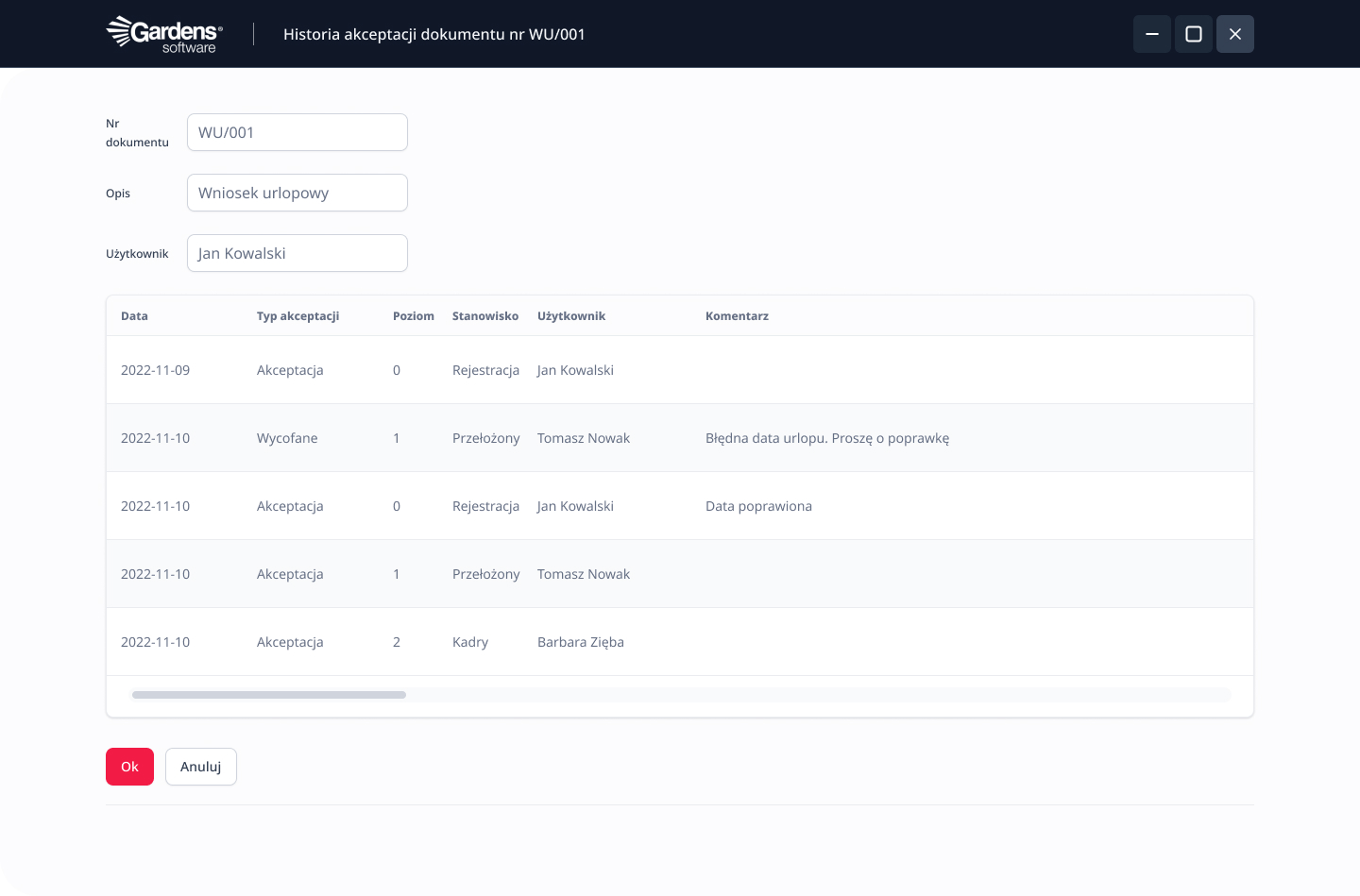
  • Full insight into the document approval history
  • Ability to recreate every stage of the document flow

Ability to implement alerts

W jednym miejscu, możesz mieć pełny raport wyników firmy, z filtrami oraz analizą.
Optimize the flow of information and react proactively to key events, automatically receiving alerts about approaching deadlines, budget overruns, or other important situations.
  • Designing alerts in the form of, e.g., email messages
  • Creating tasks in the calendar for a given employee

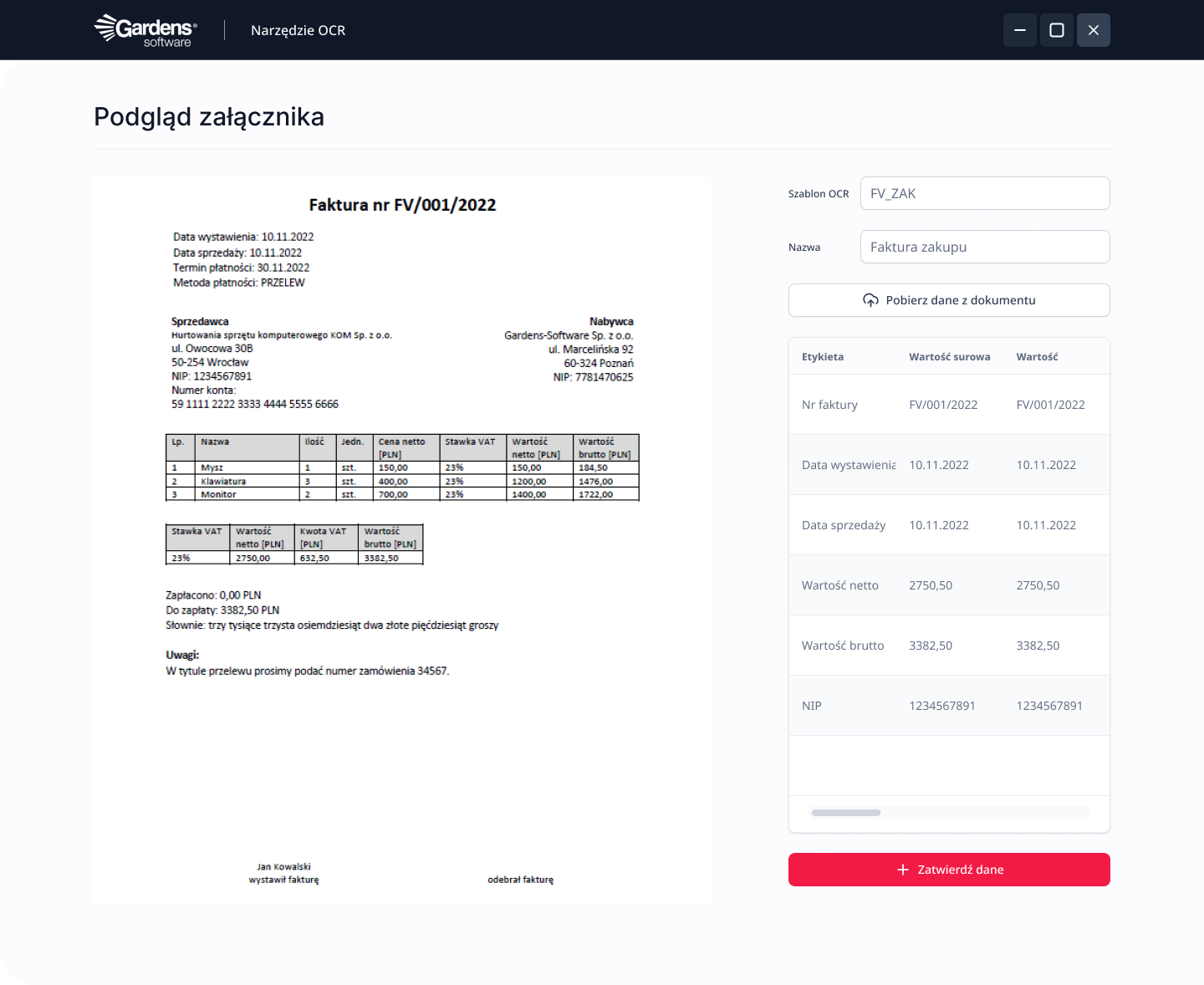
OCR

Save time and minimize the risk of errors by automatically converting scanned documents into editable text formats using OCR technology.
  • Ability to implement the OCR tool – The System is able to recognize the content contained in an invoice itself, such as: Contractor's NIP (Tax ID), amounts, payment deadlines, etc.
Gardens ERP
Oprogramowanie dopasowane do potrzeb Twojego biznesu.
Document workflow configuration
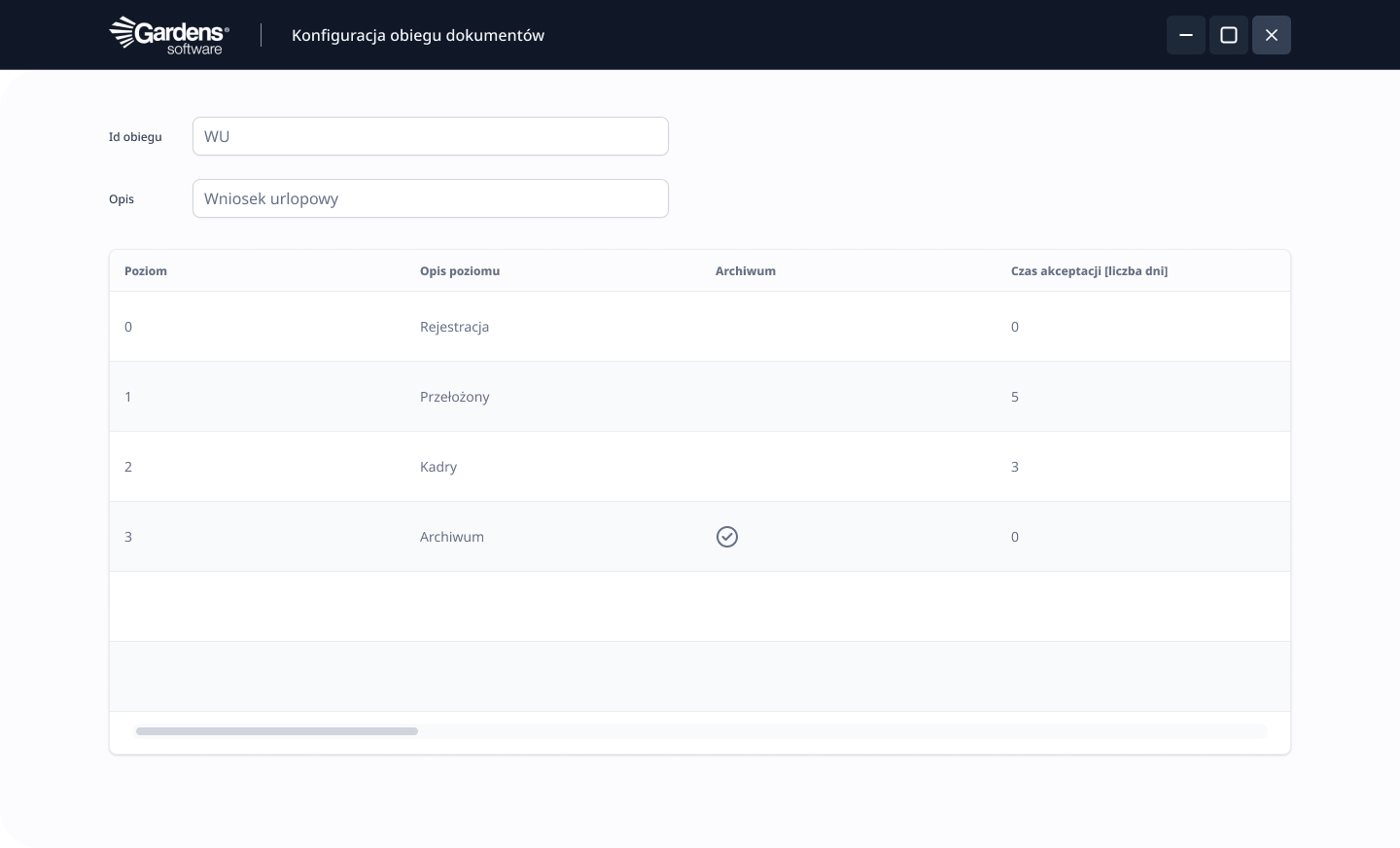
Self-definition of document workflow processes
Defining requirements that a document must meet to proceed to the next level
Ability to map any document workflow process within the enterprise
Defining the workflow path depending on the document's characteristic, e.g., for purchase invoices, invoice value – invoices with values greater than the declared amount go to the appropriate individuals, acceptance documents, e.g., contract to a specific PM supervisor of the contract, this characteristic can be freely defined
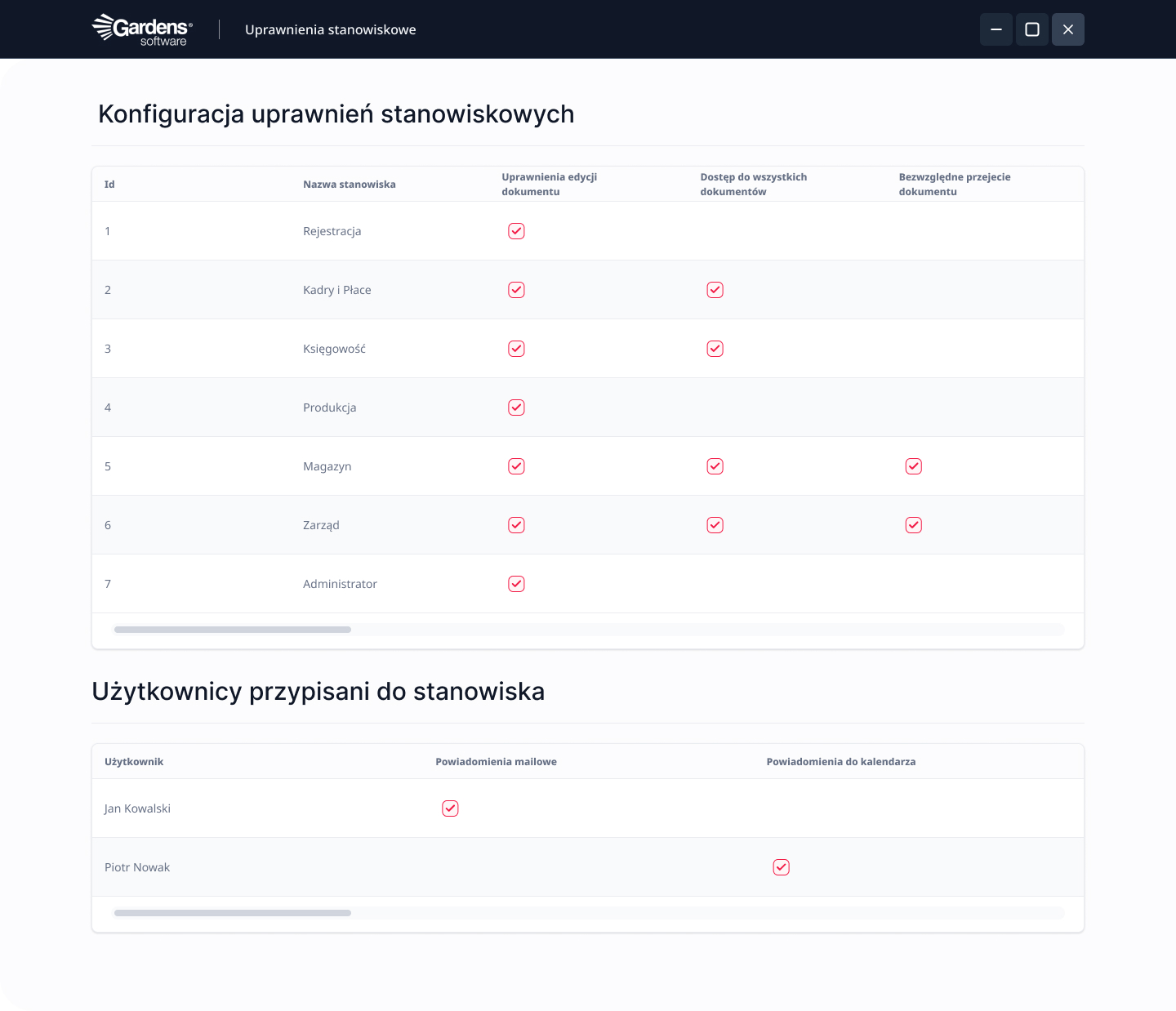
Defining permissions at individual document approval levels
Assigning users to positions
Managing data visibility in documents for specific user groups
Managing the possibility of editing data in the workflow of a given document
Managing access to individual workflows
Managing the possibility of taking over a document from another person
Defining the information necessary to complete at a given stage of the workflow
Setting a time limit for document approval at a given level
Defining substitutions – the GAS configuration manages the transition of a document to users who are defined as substitutes, e.g., when an employee goes on vacation, their documents go to another user; upon return, they revert back to the original employee. GAS starts the process after midnight, which manages the transition of these documents
Tracking the approval status of individual documents and their archiving
Viewing the list of all documents awaiting approval for a user
Full insight into the document approval history
Ability to precisely recreate every stage of the document flow in the workflow, along with detailed information regarding, e.g., reasons for rejection or withdrawal
Ability to filter and sort documents according to set criteria
Support for multiple file formats attached to the workflow
Ability to attach appendices to the workflow in any format
Insight into the history of attached appendices in a given workflow with information such as the date of entry, type, person entering, etc.
Ability to display attachments in pdf, doc, or png format in a system window
Ability to implement alerts
Creating tasks in the calendar for a given employee
Designing alerts in the form of, e.g., e-mail messages upon a document's transition to a certain level or its archiving
Other document workflow functionalities
Defining a folder from which the user can feed the workflow with a collection of documents – hypothetically, if a user has to input a large number of purchase invoices into the workflow, it is enough to paste everything into one folder, and with the help of one function, the user will create as many workflows as there are documents in the folder; the system will attach the invoice as an appendix to each workflow and move the documents from the folder to the archive
Possibility of implementing the OCR tool – automation of work with documents. Thanks to this tool, the system is able to recognize content contained in the document, such as the contractor's Tax ID (NIP), amounts, payment terms on the invoice, and then populate the corresponding fields in the system after user approval
Integration of the workflow with other system modules – due to the fact that the Gardens application is part of the integrated Gardens ERP system, any data registered in other functional modules of the Gardens ERP system can be used for analysis, e.g., approval of a purchase invoice (integration with the financial and accounting module), acceptance of an employee's vacation request (integration with the KIP module) or managing a list of user tasks (integration with the CRM module)
Ability to automatically generate processes – an example here could be the posting of a purchase invoice after completing all necessary data and the document moving to the archive, or the approval of an employee's vacation request along with an automatic email notification to that user
Mobile access to the workflow via browser or mobile application.

Electronic signature

Other modules

ERP Document Workflow

The ERP system module for document management allows for the collection and cataloging of all types of forms in the organization. We have also foreseen the possibility of defining your own EOD processes and adapting them to the specific needs of the company. Check how this module of our system can streamline document workflow and increase the security of its flow!

What benefits does Electronic Document Workflow bring?

The ERP system for document workflow is not just a tool for transferring invoices or correspondence, although that is what it is most often associated with. An employee operating the system can freely shape any process related to document workflow, including:

  • negotiating contracts,
  • accepting offers,
  • employee request circulation,
  • managing work schedules, absence calendars, etc.

The most important advantages of the EOD module in the company management system include:

  • integration with other ERP system modules (Orders, Payments, Invoices, Contracts, Contractors);
  • monitoring the time taken to process requests and reacting to delays on an ongoing basis;
  • a high degree of document transfer security (safeguards, individual access permissions, data backups);
  • the ability to expand the module with additional functions as needed;
  • increased work efficiency;
  • access to all data in one place.

Functions of the ERP system for document management

The designers of this module prioritized streamlining document management and the correct flow of information in the enterprise. Thanks to EOD, both internal documents and those flowing into the company from outside can be managed.

The employee can access them both historically and in real time. This is a way to limit paper versions of documents to the necessary minimum. Here are the most important functions we have foreseen in our EOD system.

Configuration of workflow and definition of permissions

This function allowed for the programming of document workflow in accordance with the internal requirements of the organization. It allowed for, among other things:

  • reproducing any document flow process in the enterprise,
  • managing access to individual workflows,
  • defining substitutes.

Document acceptance tracking

Gardens-Software also allowed for the definition of acceptance paths tailored to specific business needs. In practice, this ensured:

  • previewing the list of documents awaiting acceptance,
  • unlimited access to the document acceptance history,
  • the possibility of reproducing every stage of the document flow.

Implementation of alerts

The employee gains the possibility of setting up email notifications. They contain information about current changes that have been made to a given document.

What challenges can we help you face?

Properly prepared documentation and its circulation are the foundation of every enterprise's functioning. Individual letters or requests require completion and acceptance at various levels. What does the digitization of this process change?

In the traditional document flow, the document is printed, completed, and finally reaches the next people on the list through regular mail. It is not possible to obtain additional arrangements quickly by phone or email. The document flow automatically extends, and sometimes even causes project delays. An extreme case is the loss of documents.

The Electronic Document Flow designed by the Gardens-Software team allowed for the smooth and effective transfer of paper documentation to the electronic version. Thanks to this, documents can be organized, shared, and archived in an easy and secure way. Deciding on the implementation of an ERP system in the company in this regard increases the comfort of work for people dealing with document flow, and also minimizes the risk of potential errors in the process.

Tell us about your business needs, and we will find an appropriate solution and provide the necessary support at every stage of system implementation. We invite you to cooperate!

Ready for a new level of company management?

Fill out the form to see:

  • How our customized ERP system and integrated IDE environment works
  • How you can better, faster, and cheaper adapt the system to your needs
  • How we differ from standard ERP systems and boxed solutions
Don't wait, write to us!
We will contact you within 24h!
Zgoda*